
SHOUTLOOP
AI Based Customer Review Portal
HCD for AI | IXD | Associate Experience
Shoutloop is an enterprise platform designed to centralize and automate the lifecycle of customer reviews. By integrating AI as a collaborative assistant, the tool transforms a manual, Excel-heavy process into a streamlined, "human-in-the-loop" redressal workflow.
Role
Product designer
Timeline
2022
Tools
Miro, Figma, Sketch, Abstract, Invision, Zeplin

.png)
The Challenge: Fragmented Redressal
Prior to Shoutloop, Product Associates and Managers faced severe operational bottlenecks:
Manual Data Silos
Product Associates painstakingly maintained monthly Excel sheets, pulling data from various sources like Medallia, Appbot, and Apptentive. This was a time-consuming, error-prone, and unsustainable process.
Disconnected Actions:
Data visualization relied on exporting to external tools like PowerBI, creating a siloed experience where insights were disconnected from the action-taking process.
Delayed Resolution:
A lack of direct integration with issue-tracking systems meant customer feedback often languished, leading to slow response times and inconsistent issue resolution.
The 'before' state: A fragmented, manual workflow involving multiple platforms and monthly Excel sheets, highlighting the inefficiency.
PROCESS
.png)
We further collaborated with product owners to refine this process to align with the goals of the product.

Although this was the plan outline, we had adapt our process into Agile sprints to collaborate with other team members. The plan also changed as the project progressed due to changing business requirements.
Discovery
Interviews with product stakeholders & leads
We had multiple discussions and interviews with stakeholders to understand the vision for the project. Based on the interviews we mapped out the existing process used in the company and expected process.

This was followed by workshop with the stakeholders to identify their priorities for the tool. Following were the four major priorities that we identified from the stakeholders perspective
1.Sentiment Analysis
2.Feature Mapping
3.Raise JIRA
4. Send reply to users
We also performed stakeholder mapping to assess impact of each of the stakeholders on the project. This helped us set up a regular review sessions with the stakeholders to get their feedback and make informed decisions.

Initial brainstorming after interviews
As initial analysis of the interviews we brainstormed on the features that the tool can have. We also classified these stickies in three separate user groups of ‘Product Associate’, ‘Product Manager’ and ‘Admin’.

Define
Personas
There were two major user groups who would use this too; Product Associate and Product Manager. The third user group (Admin) is not the direct consumer of the content of the tool but this user will be responsible for managing and maintaining various aspects of this tool.
.png)
Prioritising features and Affinity mapping
There were two major user groups who would use this too; Product Associate and Product Manager. The third user group (Admin) is not the direct consumer of the content of the tool but this user will be responsible for managing and maintaining various aspects of this tool.

Scope for initial release
After discussions with the product team and the client, following requirements were decided for MVP release:
1. Show reviews from Appbot, Apptentive, Medallia
2. Use AI to classify reviews in Positive, Negative & Neutral sentiments
3. Use AI to classify reviews into 21 categories and additional sub-categories
4. Allow users to raise JIRA tickets only for negative reviews
5. Allow users to reply to negative reviews
6. Get resolved reviews from JIRA and allow users to reply to customers to close the review
Ideate
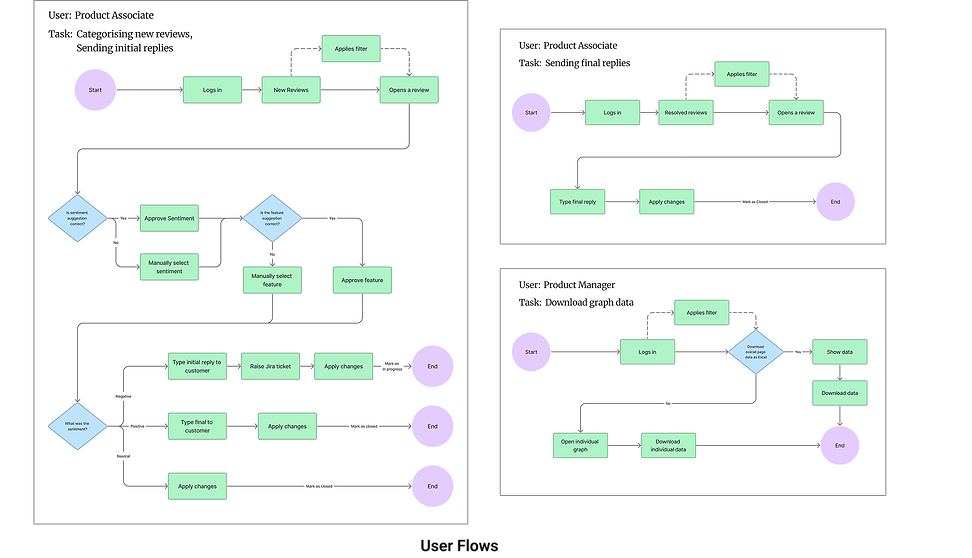
User Flows
Three major user flows were targeted for MVP.
.png)
Information Architecture for the MVP

Wireframes
We had multiple iterations and stakeholder reviews for each feature of the tool before arriving at the final screens. I have highlighted below two of the major areas that would determine the experience of the tool to the user (Product Associate): Structure of the reviews page (landing page) and integration of AI suggestions in the tool. For MVP, the analysis page (for Product Manager) was not given top priority and it was supposed to have minimum functionalities.

‘Option 2’ was selected for the page structure since it gives ability to open each review as a right hand panel as a dedicated action area (as opposed to option 1 where positions of review actions keep changing as per scroll position). It also allows the user to readily access other features of the page without having to click a ‘cancel’ button (unlike in option 3).

Integrating AI with users workflow was one of the major focus areas while designing the right hand panel and tool as a whole. The way AI suggestions would be shown in the app would define how the user perceives the AI; as an ‘assistant’ or as a ‘master’. Option 4 was selected since it shows AI suggestions but also gives users freedom to approve or reject the suggestion.

Logo Explorations

For initial logo explorations we wanted to highlight ‘AIOps’ aspect of the tool. These explorations were given to the visual design team for final logo design for MVP.
Design
Re-imagined Designs
Due to NDA, final screens cannot be presented here. Below are re-imagined screens of the tool.
Review Lifecycle – Intake Stage Screen
.png)
AI-Powered Review Insights
This screen transforms the interface from a review management dashboard into a decision-support system by integrating AI-driven insights with direct operational actions.
.png)
Review Moderation Workspace
This screen transforms the dashboard from an analytical interface into an action-oriented moderation workspace by integrating AI assistance, validation loops, escalation pathways, and controlled response mechanisms within a single view.
.png)
High-Volume Review Assignment Interface
This screen introduces a contextual bulk-management workflow, enabling high-volume triaging while preserving clarity, reversibility, and action prioritization.
.png)
Resolution & Audit Workspace
This screen completes the operational lifecycle by introducing auditability, classification permanence, and communication traceability - transforming the tool into a governance-ready moderation system.
.png)
Analytics & Insight Visualization Interface
This screen elevates the tool from operational moderation to strategic intelligence by combining KPI snapshots, trend visualization, distribution analysis, and feature-level impact mapping into a unified analytics dashboard.
.png)
Design Hand-off
The designs were made on Sketch App and were shared with the developers using Zeplin. Multiple sessions with developers and QA team was held to make sure that the right designs were implemented. MVP was released for one product team and was presented in multiple company events.
Awards & Recognition
The efforts of design team were widely recognised and appreciated on various platforms in the company
